Zhejiang Shenda Printing Machinery Co., Ltd
+86-577-65515888

They have the high quality colors(25600), their storage can reach 170 groups, every group have 250 cut, Its storage time can reach 300,000 hours.

Your Leading Zhejiang Shenda Printing Machinery Co., Ltd. Supplier


Zhejiang Shenda Printing Machinery Co., Ltd. in China's production base of printing and packaging machinery - Ruian City, Zhejiang Province, is a research, production, sales, service, and export as one of the high-tech machinery and equipment manufacturers.


Why Choose Us
 

High quality
The company relies on complete mechanical processing equipment, improve process design, introduction of modern high-tech home and abroad.


Competitive price
We offering a higher-quality product or service at an equivalent price. As a result we have a growing and loyal customer base.


One-stop solution
If there is something goes wrong , you can call us ,video-chat ,email us .and we will give solutions within 36 hrs.


Technical support
We have 2,000 technical team and 6,000 obtain patent.


First 1234 Last 1/4
Double Hydraulic Paper Cutting Machine


What is Paper Cutting Machine

Paper trimmers are sometimes called cutters, but this isn't always accurate. A paper cutter is usually a guillotine device. It uses a chopping action. You lift the arm and then press down to lower the blade through the paper.


You may also encounter the terms hydraulic paper cutter and stack paper cutter. A stack paper cutter is a heavy-duty model designed to handle very thick stacks of paper. A hydraulic cutter is a guillotine cutter powered by a hydraulic arm.


Benefits of Paper Cutting Machine
 

Increase productivity and efficiency
One of the most significant benefits of using a paper cutter machine is that it can significantly increase productivity and efficiency in the office. With a paper cutter machine, you can cut multiple sheets of paper at once, saving you time and effort. This is especially useful if you have to cut a large number of documents regularly. With a paper machine, you can complete the task in a fraction of the time it would take to cut the paper manually.


Cost savings
Investing in a paper machine can help you save money in the long run. The machine allows you to cut paper to the exact size you need, reducing waste and saving money on paper costs. Additionally, it eliminates the need to outsource cutting services, saving you money on outsourcing fees. With a paper cutter machine, you can do the job in-house, saving you both time and money.


Correctness and accuracy
A high-quality paper cutting machine ensures correctness and accuracy with every cut. This is essential whether you're cutting difficult designs for crafts or particular depth for professional documents. Contrary cuts not only lead to wasted materials but can also detract from the aesthetic and functional quality of your work. Superior and advanced technology are used by high-quality machines to ensure every cut is exact, improving the final product quality and flexibility of your projects.


Durability and long life
High-quality paper-cutting machines are long-lasting machines with durability. These machines are equipped with strong materials and appropriate craftsmanship. The investment made in these machines will be long-lasting and benefit you for many years.Some machines break down and need constant repairs, but high-quality paper-cutting machines are reliable as a long-term investment. It offers less downtime and fewer replacements and saves money and time. The operations work efficiently and smoothly with high-quality machines. It is concluded that investing in a high-quality machine will give you good outcomes for a longer period.


Adaptability and time-saving
In every creative or professional content, adaptability is important. High-quality paper cutting machines are designed to optimize productivity with features that quicken and simplify the cutting process. When used alongside other equipment like Hot Foil Stamping Machines, Die Cutting Machines, this can be beneficial where speed and accuracy is important. Advanced properties like high-speed blades, programmable settings, and automated cutting options, allows you to finish projects more quickly and free up more time to focus on other tasks.


Types of Paper Cutting Machine

Stack cutters
Stack cutters are special commercial paper cutters used by print shops and businesses that regularly handle large amounts of paper. These paper trimmers instantly cut large volumes of paper. With a commercial stack paper cutter, you can be sure to receive a clean, precise cut every time. These heavy-duty paper cutters are available as both automatic and manual machines.


Board trimmers
Another popular type of paper cutter is a board trimmer. Board trimmers are heavy-duty machines used to cut thick materials such as cardboard, foam boards, and various other heavy materials. Board trimmers are specifically designed to cut through thicker materials that a regular machine may be unable to cut through. They are able to do this thanks to their sharp blades made from high-quality materials such as steel.


Rotary trimmers
Rotary trimmers, also known as rotary paper cutters, cut paper in a smooth motion, which helps achieve complete accuracy and precision with each cut. A rotary trimmer machine is ideal for cutting pieces of paper on a large scale, and can easily cut through materials such as card stock, photographs, and laminated sheets.

Rotary trimmers often have safety features to keep its users protected. For example, the blade may be enclosed safely inside the cutting head to avoid any incidents, or a safety guard may be available to place over the rotary blade when it is not in use.


Guillotine paper cutters
Guillotine cutters are one of the most popular options available in the market. They are available in several shapes and sizes, making them excellent choices for all businesses. These cutters contain a hinged blade that easily comes down to deliver a sharp, clean cut.

Business card cutters

Business card cutters make it easy to create your own cards - without sacrificing professionalism. These cutters are ideal for all kinds of corporations, from small print shops to large corporate organizations. Many business card cutters contain a self-sharpening blade that enables complete precision every time, and the Formax FlashCard Tabletop Business Card Cutter is an excellent example.

Electric paper cutters

Electric paper cutters have an automatic motor that professionally cuts sheets of paper. They offer an improved user experience, and users simply have to press a button and then wait for the machine to automatically cut paper. Due to their complete ease of use, electric paper cutters are often preferred to their manual counterparts.

Corner rounders

Corner rounders, also known as corner paper trimmers, round the corners of different types of documents, to give them a completely professional, aesthetically pleasing look. Corner paper trimmers are ideal for improving the appearance of postcards, business cards, and flyers. These machines perform well with laminated documents, as well as those made from card stock and photo paper.


Application of Paper Cutting Machine


Crafting and scrapbooking
Paper cutters are a staple tool for craft enthusiasts and scrapbookers. With their precise cutting blades and adjustable guides, they make it easy to create clean, straight cuts in paper, cardstock, and other materials. Whether you're making greeting cards, photo albums, or decorative paper crafts, a paper cutter ensures professional-looking results every time.


Office and administrative tasks
In the office, paper cutters are indispensable for handling paperwork efficiently. They streamline tasks such as cutting documents, flyers, and brochures to desired sizes. Paper cutters are particularly useful for creating professional presentations, trimming laminated sheets, or cutting labels and business cards. With their accuracy and speed, they save time and ensure a polished finish.


Education and classroom use
Teachers and students alike benefit from the use of paper cutters in the classroom. Teachers can easily create visual aids, flashcards, or bulletin board decorations with precise cuts. Students can also use paper cutters for art projects, creating collages, or cutting out shapes for assignments. With safety features in place, paper cutters are a convenient tool for educational activities.


Print shops and graphic design
Print shops and graphic designers rely on paper cutters for precision trimming of flyers, brochures, posters, and other printed materials. These machines handle large volumes of paper with ease, ensuring consistent and accurate cuts. Paper cutters are essential for achieving professional-quality results in the printing industry.


Packaging and shipping
In the world of packaging and shipping, paper cutters are invaluable tools. They are used to cut and trim cardboard, bubble wrap, and other packaging materials to fit various products. With the ability to handle different thicknesses and sizes, paper cutters make packaging tasks more efficient and ensure secure shipping.


Components of Paper Cutting Machine


Fully Automatic Paper Cutting Machine

Blade guard

The blade guard can be metal or plastic and should prevent users from putting their fingers near either side of the blade. A blade guard is a necessary safety feature available on guillotine cutters.

A4 Paper Cutting Machine

Blade latch/lock

The blade latch or lock secures the blade in a closed position so the blade cannot be accessed. The latch will must be moved or removed before the paper cutter can be used.

Office Paper Cutting Machine

Tension spring

The tension spring is usually attached to the rear of the blade. It prevents the blade from being pulled downward by gravity when the handle is released.


Process of Paper Cutting Machine


Check whether the photoelectric protection switch of the paper cutting machine is normal and reliable before starting each time. First try the empty knife three times, observe whether the knife is back, find that the abnormal switch is strictly prohibited, and it can be used after professional maintenance.


Before starting the machine, fill all lubricating points with labeled lubricating oil. You must pay attention to the surrounding environment, whether someone is carrying out other maintenance work on the machine.


Check the operation of the machine, the centralized lubrication system, the emergency stop button of each part, and whether the safety device is normal.


No tools or other objects are placed on the top of the paper cutting machine(such as steel ruler, plate handle, screwdriver).


When installing or disassembling the cutting blade, manual operation should be adopted. Only after the main motor is completely stopped can the switch be switched to the position of the tool change switch.


When adjusting the depth of the rubber strip of the paper cutting machine, the paper cutting machineshould be adjusted higher first, and then the depth of the rubber strip should be carefully adjusted from shallow to deep.


After the blade edge is blunted, the blade should be replaced immediately. Do not continue to use, so as to avoid excessive load of the machine and damage to the parts.


The pressure adjustment of the paper cutting machinepress shall not be greater than 60kg/cm2. (Usually around 45 is OK).


How to Maintain Paper Cutting Machine
 
Blade sharpening

The blades of a paper cutter can become dull over time due to repeated use. Dull blades can lead to inaccurate cuts and can put unnecessary strain on the motor. It is crucial to periodically sharpen the blades to maintain their cutting efficiency. Depending on the usage and the type of paper being cut, blade sharpening can be done every few months or as needed.

Lubrication

The moving parts of a paper cutter, such as the blade carriage, should be properly lubricated to reduce friction and ensure smooth operation. Applying a suitable lubricant, as recommended by the manufacturer, helps prevent premature wear and tear of components. It is important to follow the manufacturer's guidelines regarding the type and frequency of lubrication.

Cleaning

Dust and debris can accumulate on the cutting surface, guide rails, and other parts of the paper cutter. Regular cleaning is essential to maintain precision and prevent any buildup that may interfere with the cutting process. Use a soft cloth or brush to remove debris, and if necessary, use a mild cleaning solution recommended by the manufacturer.

Inspection and adjustment

Periodically inspect the paper cutter for any signs of damage or misalignment. Check for loose bolts, screws, or any other components that may need tightening. It is also important to ensure that the paper cutter is properly aligned to achieve accurate and consistent cuts. Consult the manufacturer's manual for instructions on how to adjust the alignment if necessary.

Safety checks

Safety is paramount when working with a paper cutter. Regularly inspect safety features such as blade guards, safety switches, and emergency stop buttons to ensure they are functioning correctly. Any damaged or worn-out safety components should be replaced immediately to prevent accidents.


How Paper Cutters Work

Paper cutting machines generally work the same way that commercial graphics cutters do, only on a smaller scale: you enter the computerized image into the machine, and the machine's hard drive retrieves the image and cuts it on the included paper. Cutting machines work similarly to printers, only instead of printing images with ink or a laser, they use a micro blade to score the image into paper and make precise cuts.

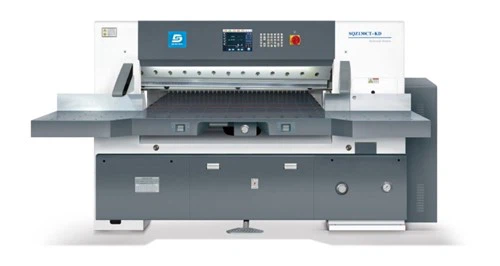
Double Hydraulic Computerized Paper Cutting Machine


What Is the Difference Between Paper Cutters and Paper Trimmers


Paper cutters are devices used to cut large heaps of paper or thick materials with precision. The machine typically has a flat surface with a sharp cutting blade or edge. In order to use the product, the user has to place the paper on the flat surface, align the paper, and lower the blade to cut the paper. An advantage of paper cutters is that they can cut stacks of paper at one time.


Paper trimmers are tools used for cutting individual sheets of paper or thin materials. They usually have a circular rotary blade that moves along a guide. The rotary blade allows for smooth and accurate cutting without ripping up or crushing the paper. These devices are made for lighter cutting tasks that require high levels of precision and control.


While both paper cutters and trimmers cut and trim paper, they are designed for different types of tasks and volumes. Paper cutters are meant for heavy-duty cutting in professional settings, while paper trimmers are intended for cutting smaller quantities and lightweight materials in creative and hobbyist environments.


Paper cutters are used in the printing and publishing industry, businesses, and office settings to cut large stacks of paper to the desired size for books, to cut documents, and to cut brochures. Paper trimmers are used in schools and educational institutions to trim documents, flyers, presentations, and other paper-based materials.


How to Choose a Paper Cutter


Identify your needs
Establish your specific cutting requirements. Consider the types of materials you’ll be cutting, the sizes of paper or materials you will use, and the volume of cutting you want to accomplish. Paper cutters are designed for cutting paper, but some models can cut through cardboard, laminated sheets, labels, and photographs. Most paper cutters can accommodate letter size paper (8.5” x 11”), which is the standard paper size for documents and printing, and legal size paper (8.5” x 14”), which is used for legal documents. Determine if you are doing low volume, medium volume, or high volume cutting.


Cutting capacity
Cutting capacity is the maximum number of sheets a paper cutting machine can cut at one time. Choose a paper cutter that can facilitate your typical workload without damaging the machine, or giving up the quality of cutting you want. Manual paper cutters have a cutting capacity of about 10 to 50 sheets of standard sized paper per pass. Semi-automatic paper cutters have a cutting capacity of about 100 to 300 sheets of standard sized paper per pass. On the other hand, automatic paper cutters have a cutting capacity of 200 to 1,000 or more sheets of standard sized paper per pass.


Cutting width
The cutting width is the maximum width of paper or materials the paper cutter can cut. The cutting widths of paper cutters vary based on the specific type of machine, its intended use, and the manufacturer’s design. Make sure that the cutting width of the paper cutter you plan to buy is a good fit for the work you plan to do.


Type of cutter
Evaluate whether you need a manual, semi-automatic, or automatic paper cutter based on your workload and desired level of automation. Manual paper cutters require the user to physically operate the cutting mechanism by hand. This could involve pulling a lever or handle to bring down the cutting blade onto the paper. Semi-automatic paper cutters combine manual operation with motorized cutting. They are controlled by a foot pedal or button. Automatic paper cutters operate fully automatic with motorized cutting, and usually have a control panel that allows the user to set cutting parameters.


Safety features
Paper cutters have sharp blades, so it is important to research safety features such as blade guards, safety locks, and shields that prevent accidentally activating the cutting blade. A blade guard on a paper cutter protects users from the sharp cutting blade when their machines are not being used, or during operation. A safety lock on a paper cutter protects users when they are setting up their paper cutters, during maintenance, or when their machines are not in use. Shields on a paper cutter cover the cutting blade and provide an extra layer of safety.


Accuracy and precision
Take a look at reviews of paper cutters and their specifications to understand the accuracy and precision of each paper cutters’ cutting results. Check for features such as measurement guides and alignment aids. These features could consist of rulers, scales, grids, and other markings on the cutting surface of paper cutters. They help users accurately position and align their paper for cutting.


Durability and build quality
Consider the durability and quality of paper cutting machines. They can be made out of steel, cast aluminum, and cast iron. Paper cutters with sturdy construction tend to last longer and perform better over time. The devices range from basic, lightweight models built for occasional use to heavy-duty commercial machines that are constructed for high-volume cutting.


Replacement parts
Check to see if the paper cutter you want to buy has replaceable components like cutting sticks and blades. A cutting stick is a rectangular bar made of durable plastic material. It is put on the bed of a paper cutter, parallel to the cutting blade’s edge. When the user makes a cut, the blade presses into the cutting stick, creating a groove. The groove prevents the blade from dulling too quickly, and ensures that it has a controlled and accurate cutting path. This reduces wear on the blade’s edge and minimizes the impact on the blade’s sharpness. When the groove becomes too deep, the user has to replace the cutting stick to maintain the quality of cuts. Also, many paper cutting machines are made with replaceable cutting blades so a dull blade is replaced with a new blade when the old one is ineffective.


Ease of use
Find a paper cutter with an intuitive interface and user-friendly controls. There are models that have digital displays and programmable settings for more efficient operation. A digital display on a paper cutter is a visual interface that gives users real-time information and feedback about the cutting process. It can show precise measurements, and may include measurements in inches, centimeters, or both. Programmable settings allow users to program and save specific cutting settings for different materials or cutting jobs. These settings can be recalled for future use.


productcate-1-1


Our Factory

Professional production of paper cutter, cutting system, creasing and cutting machine, computer bronzing die-cutting machine four series of printing machinery products, the company relies on complete mechanical processing equipment, improve process design, high-quality personnel requirements, introduction of modern high-tech home and abroad, to develop collection "optical, mechanical, electrical, hydraulic," as one of a series of products.


Our Certificate
 

productcate-1-1

productcate-1-1

productcate-1-1

productcate-1-1


FAQ
 

Q: What are the three types of paper cutters?

A: There are three types of paper cutters: manual, semi-automatic, and automatic paper cutters. Manual paper cutters require manual effort to operate the cutting mechanism. However, semi-automatic and automatic models have motorized or automated cutting mechanisms. These models are also known as electric paper cutters.

Q: What is the difference between a paper cutter and trimmer?

A: To sum it all up: a rotary paper trimmer is better equipped to handle large-scale cutting tasks while a guillotine paper cutter is better equipped to handle a large volume of paper at once. If you're looking to trim photographs and posters, you should utilize a rotary paper trimmer.

Q: What is the difference between a paper cutter and a stack cutter?

A: A stack paper cutter is a heavy-duty model designed to handle very thick stacks of paper. A hydraulic cutter is a guillotine cutter powered by a hydraulic arm. Paper cutters are ideal for large stacks of paper and thicker paper stocks. They're also great if you have many paper-cutting projects.

Q: What is a paper cutting machine called?

A: A paper cutter, also known as a paper guillotine or simply a guillotine, is a tool often found in offices and classrooms.

Q: Which is better, guillotine or rotary paper cutter?

A: If you're working with photographs, large format pieces, or projects that require crisp accurate individualized cuts, a Rotary Paper Trimmer is your best bet. If you generally need to cut a larger quantity of sheets at a time, or thicker media, the Guillotine Trimmer may be the better choice.

Q: Can you cut cardboard with a paper cutter?

A: Board Trimmers
Another popular type of paper cutter is a board trimmer. Board trimmers are heavy-duty machines used to cut thick materials such as cardboard, foam boards, and various other heavy materials.

Q: Can a paper cutter cut plastic?

A: A rotary trimmer is safe to use and requires little maintenance with self-sharpening features. A good rotary trimmer can trim more than paper including plastic films, vinyl, and PVC. Little to no skill is required to operate this essential piece of office or print shop equipment.

Q: Which mechanism is used in paper cutting machine?

A: Paper Cutting Machine using Geneva Mechanism.

Q: How to grease a paper cutter?

A: The front side is easy. Take some grease on your finger and rub it on the left side front of the knife bar. Cycle the cutter and stop the knife down like you are doing a knife change and rub some on the right side of the knife bar.

Q: What are the safety precautions for paper cutting machine?

A: Keep loose clothing, jewelry and hair away from cutting blade. Do not use a cutter when you are distracted. Ensure the blade guard is in place before use. Do not use a guillotine cutter if it does not have a functioning guard, latch/lock and tension spring.

Q: What are the hazards of paper cutters?

A: Lacerations, especially to fingers Avoid contact with blade by making sure blade guard is in place and handle is locked down before moving paper cutter. Pick up paper cutter by non-blade edges. Hold paper cutter with blade away from the body. Be aware of co-workers or bystanders as you perform this task.

Q: How do you fix a squeaky paper cutter?

A: It could be the cutting head is slightly out of alignment. Pull the cutting head to the middle of the bar and turn it slightly away from the base. Run it back and forth a few times without paper to be sure it is still running smoothly. Also, you can lubricate the blade with graphite spray.

Q: Can you use olive oil to lubricate shredder?

A: Also, you shouldn't use vegetable oil, olive oil, or another type of generic oil as a lubricant for your shredder. These types of generic oils can damage your machine. You should always use official shredder oil. You can check your shredder's user manual to find out what type of oil is recommended by the manufacturer.

Q: How to close a paper cutter?

A: Please remember to press the paper with your left hand, grab the handle with your right hand and pushing the blade slightly to the left to close to the paper cutter at the same time.

Q: Why does my paper cutter not cut properly?

A: Make sure the knife is sharp
One of the major causes of problems with a paper cutter is the use of a dull or blunt knife. Besides the inaccuracy of the cuts, the machine will be subject to unnecessary strain. See our guide to Caring for Industrial Paper Cutter Blades.

Q: What are the problems with paper cutters?

A: Additionally, manual paper cutting can lead to damaged paper sheets and uneven corners of the cut paper sheets . In terms of automatic paper cutting, problems can arise with low efficiency and the inability to press the pressure plate tightly, resulting in non-perpendicular notches and compromised production quality .

We're well-known as one of the leading paper cutting machine manufacturers in China for 35 years. If you're going to buy high quality paper cutting machine for sale, welcome to get more information from our factory. For price consultation, contact us.

Cutting System For Paper Cutting Machine, Industrial Heavy Duty Creasing And Cutting Machine

(0/10)

clearall